
Modern LG washing machines include a variety of icons that help you understand the washer’s status, active features, and maintenance reminders. These LG washer symbols are designed to provide quick information during a cycle so you always know what your appliance is doing.
Unlike error codes, LG washing machine symbols usually do not indicate a malfunction. Instead, they show cycle progress, connectivity features, safety locks, and reminders such as cleaning filters or emptying the water container.
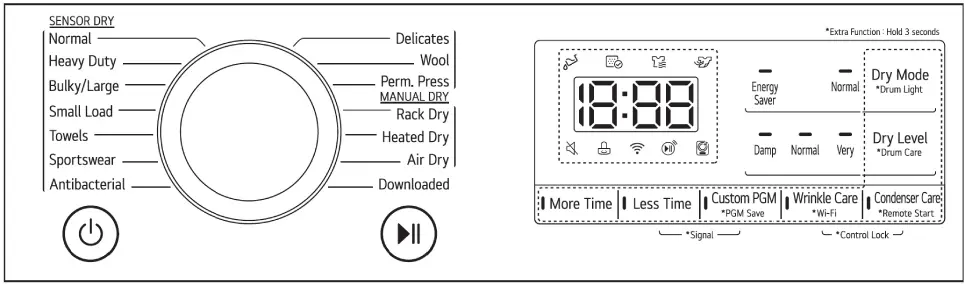
Learning the meaning of LG washer symbols helps you operate the machine more efficiently, avoid interruptions during cycles, and maintain your appliance properly.
How to Read LG Washer Symbols
Most LG washer icons appear on the control panel display. They illuminate when a specific feature or stage of the cycle is active.
These indicators may show:
- Cycle progress
- Smart features and Wi-Fi connectivity
- Maintenance reminders
- Safety locks
- Cycle completion stages
Below is a reference table explaining the most common LG washer symbols and what they mean.
LG Washer Symbols and Their Meanings
| Symbol | Name | Explanation |
|---|---|---|
 |
Water Full Indicator | This icon lights up at the beginning of a cycle to remind you to empty the water container before drying. |
 |
Lint Filter Status Indicator | This indicator reminds you to check the lint filter before starting a cycle. It also lights up if the filter needs cleaning or is missing. |
 |
Drying Stage Indicator | This icon lights up when the appliance is actively drying laundry during the cycle. |
 |
Cooling Stage Indicator | The symbol lights up during the cool-down stage. This stage helps reduce wrinkles and cool clothes before the cycle ends. |
 |
Chimes Indicator | This icon appears when the washer’s button sounds and end-of-cycle melody have been turned off. |
 |
Control Panel Lock Indicator | This symbol indicates that the control panel lock is active, preventing accidental changes during operation. |
 |
Wi-Fi Indicator | The icon lights up when the washer is connected to your home Wi-Fi network. |
 |
Remote Start Indicator | This icon shows that remote control through the LG ThinQ app has been activated. |
 |
Drum Care Indicator | The drum care symbol lights up when the drum cleaning or maintenance cycle is operating. |
Time and Status Display on LG Washers
In addition to icons, LG washing machines also display time and cycle status information on the digital screen.
Estimated Time Remaining
When a washing or drying cycle is selected, the washer shows the estimated time remaining for the cycle.
This time may change during operation because LG machines use sensors that automatically adjust cycle duration based on:
- Load size
- Fabric type
- Moisture level
- Selected cycle options
For example, Sensor Dry cycles may adjust drying time during operation to achieve optimal results.
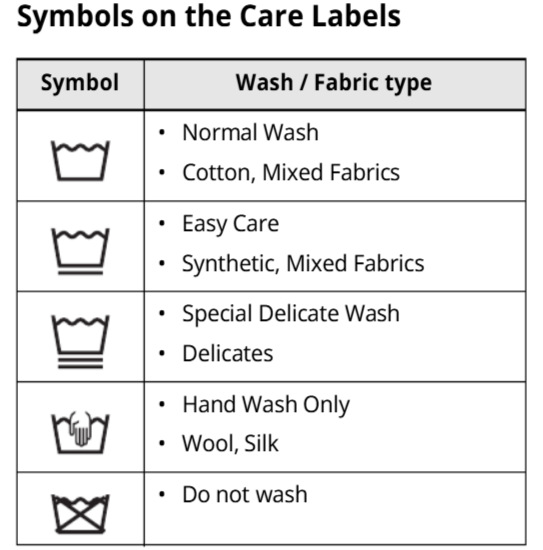
Why Understanding LG Washer Symbols Is Important
Knowing what LG washer symbols mean helps you operate your appliance more efficiently and prevents unnecessary interruptions during a wash or dry cycle.
Understanding these indicators allows you to:
- Monitor cycle progress
- Avoid accidentally changing settings
- Use smart features correctly
- Perform necessary maintenance
- Prevent operational issues
Ignoring important icons such as the lint filter reminder or drum care indicator may lead to reduced performance or longer cycle times.
When to Contact a Professional Technician
Most LG washing machine symbols simply indicate normal operation. However, if the washer stops working, displays unfamiliar symbols, or fails to start cycles, it may require professional inspection.
A qualified appliance repair technician can diagnose the issue and ensure the washer operates properly.
Conclusion
Understanding LG washer symbols helps you get the best performance from your appliance. These icons provide valuable information about cycle progress, maintenance reminders, and smart connectivity features.
By recognizing the meaning of LG washing machine symbols, you can operate your washer confidently, maintain the appliance correctly, and keep your laundry routine running smoothly.